The right buyer with the wrong details
Missing work emails, outdated phone numbers, and incomplete company records mean more searching before a rep can reach the right person.

For sales leaders with 10+ reps
We configure AI follow-up, call prep, and pipeline reviews around your CRM, then train your reps to use them.
“Fewer deals get lost. It's so easy to see prospects that need a follow up and the overall health of our pipeline”
“This tool is incredible, every sales rep needs it in their toolbox.”
“We’ve added 30+ new qualified conversations every month with the same four reps. This tool is incredible”
“5 out of 5 stars, I got it for one of my AE’s to start - he loves it and now I’m rolling it out to the whole team”
TitanStack Is Trusted By
Global and growing brands




01 · The problem
They know they should be researching prospects, preparing for calls, and writing thoughtful follow-ups. But work piles up, it gets harder to maintain. Which means fewer conversations get started, preparation gets rushed, and opportunities lose momentum.
Missing work emails, outdated phone numbers, and incomplete company records mean more searching before a rep can reach the right person.
The rep has to reconstruct the conversation, find the next steps, and write the email after a full day of calls.
The context is spread across the CRM, email, and the last call recording. Pulling it together takes time before every meeting.
An open deal has no clear next step. It sits untouched until someone spots it in the pipeline review.
Buyers raise the same concerns about price, timing, and competitors, but the best responses stay in individual reps’ heads. Everyone else has to work out an answer on their own.
Reps search for companies that fit, check buying signals, and work out who to contact. Building the list takes time away from starting conversations.
Hiring more reps adds capacity, but every new rep inherits the same manual work. The opportunity is to automate that work for the team you already have.
02 · The solution
Use AI to research prospects that match your ideal customer profile and enrich the people and companies on your list. Connect your CRM, call recorder, and sales frameworks to carry that context through call preparation, personalized follow-up drafts, and pipeline reviews.
Research companies that fit your ideal customer profile, look for buying signals, and identify the decision makers so reps start with a focused list.
Find work emails, phone numbers, and company details using your connected data providers. See verification status and missing information before reaching out.
Bring account history, buyer priorities, and open questions into one brief so reps can spend their preparation time on the conversation.
Use the transcript to prepare a draft with the buyer’s questions, commitments, and next steps. Your rep reviews and sends it.
Surface stalled deals and missing next steps so the team knows where to focus before the next pipeline meeting.
Use your sales calls to capture recurring objections and how your reps respond. Have AI organize them into a playbook your team can refine, with responses grounded in your product, customers, and sales process.
Less work between conversations. More time to advance the deal. With the team you already have.
03 · AI in action
One AI workspace that brings it all together: prospecting, contact enrichment, daily briefs, call prep, personalized follow-up drafts, call scoring, and pipeline reviews. Connected to your tools, configured to your sales process, and rolled out with training for your team.
See the workflows in action below.
04 · Everything your reps need between calls
Connect the tools your reps use, then put these workflows to work. Drafts stay under the rep’s control.
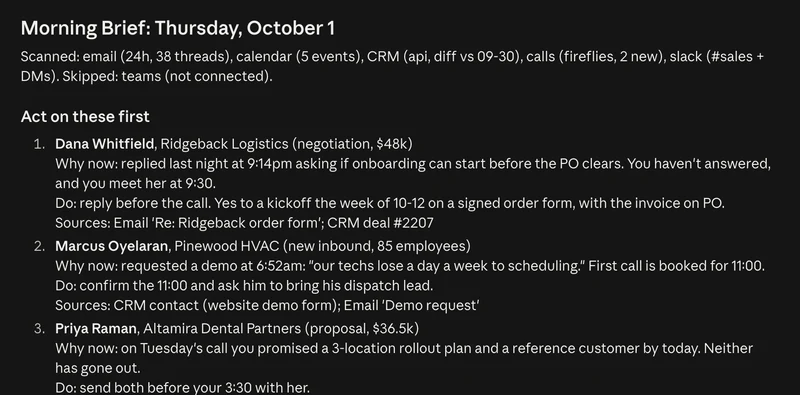
The daily brief brings together changes from your connected CRM, email, calls, and Slack. Prioritized contacts and suggested next steps give your rep a starting point.
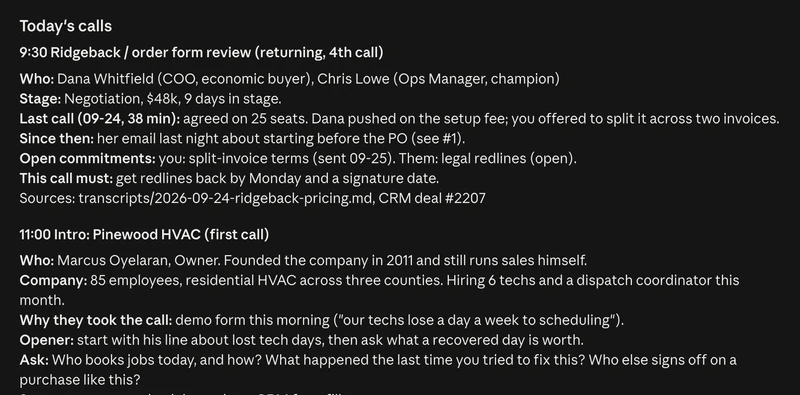
Prep cards bring together account research, previous conversations, open commitments, and questions to ask next.
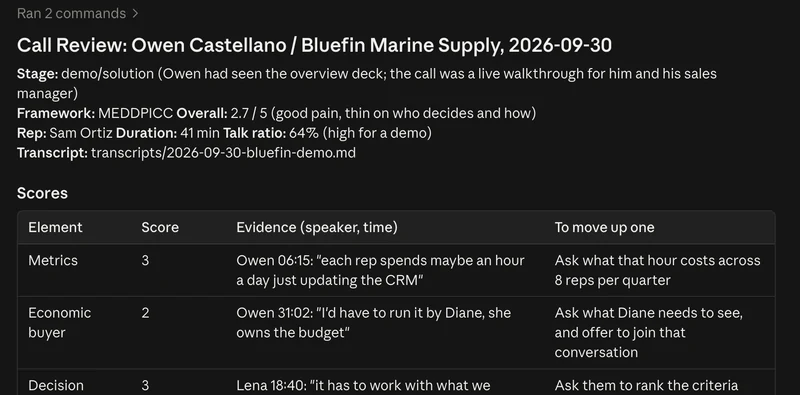
The watcher checks for new transcripts every 30 minutes. Available transcripts feed a draft in the rep’s voice, a list of next steps, and feedback on the call. Your rep reviews and sends.
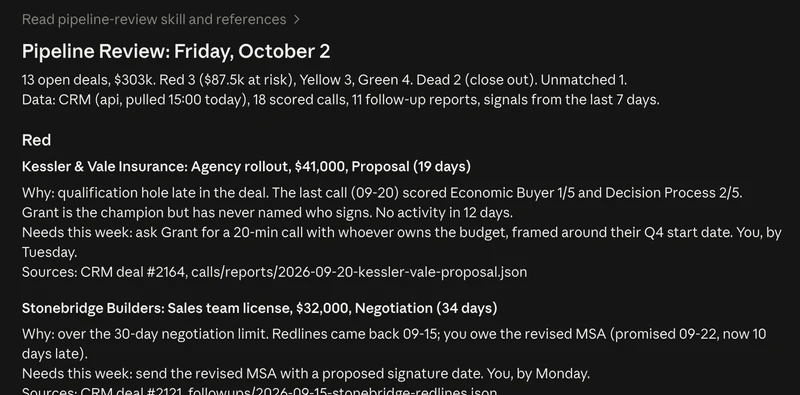
The pipeline review flags stalled deals and suggests an action for each, using CRM activity and available call context.
Account pages and a sales playbook collect buyer objections, commitments, and lessons from your calls, so reps can refer back to them.
05 · Personalized follow-ups
AI uses available call transcripts and connected account context to draft a follow-up in your rep’s voice, grounded in what the buyer actually said.
The transcript watcher checks for new calls every 30 minutes. Your rep reviews the draft, makes any edits, and sends it.
06 · How it works
01 · Connect
We connect each rep’s CRM, call recorder, email, calendar, and team chat, and build an adapter where a tool needs one.
02 · Configure
Your ICP from your own closed-won data, your call framework, your stage definitions, and each rep’s writing voice from their sent emails.
03 · Train
Every rep leaves running the brief, the call prep, and the follow-up on their own machine. We stay until they are using it without us.
Each rep needs the desktop agent, their own AI subscription, and access to the tools they connect. Scheduled jobs run on the rep’s machine.
07 · What’s in the box
We built this setup for our own sales work. The rollout gives your team the workflows, configured for your business, and the training to run them.
The workspace: agents, workflows, and commands for briefs, call prep, follow-ups, call scoring, and pipeline review, plus a structured knowledge base. One licensed workspace per rep.
We connect the supported tools and configure the workspace with each rep, on their own accounts. The onboarding coach stays in the workspace for anything they add later.
The daily brief, transcript checks, and pipeline reviews run on the schedule you choose. Scheduled work runs on the rep’s machine.
Files for your ICP, accounts, contacts, and call insights, built from the tools and transcripts you connect.
Your ICP, call framework, stage definitions, and each rep’s writing voice are set up for your business during the rollout. The skills and agents are files your team can read and edit.
08 · Your stack, your rules
Connect your CRM, call recorder, email, calendar, and team chat. The workspace files live on each rep’s machine, and your rep reviews the drafts before sending.
HubSpot, Pipedrive, and GoHighLevel connect directly. Other tools may need an adapter or CSV export; the available workflows depend on the connection.
“Inbound leads get a researched first touch within the hour. Our demo show rate went up because we're reaching people while they still care.”