
The follow-up written at 6pm
The rep has to reconstruct the conversation, find the next steps, and write the email after a full day of calls.
 Get one seat
01 · For sales teams
Sales Rep OS gives Claude ready-made workflows for daily briefs, call prep, follow-up drafts, call scoring, and pipeline reviews using your team’s connected tools.
$120 $27 per seat, one-time, for a limited time.
Trusted by Sales Reps and Sales Managers
5 out of 5 stars
“We’ve added 30+ new qualified conversations every month with the same four reps. This tool is incredible”
5 out of 5 stars
“Fewer deals get lost. It's so easy to see prospects that need a follow up and the overall health of our pipeline”
5 out of 5 stars
“I bought Claude subscriptions for the team last year and nobody used it. No one wanted to actually figure it out. This tool walks you through getting set up step by step and makes it easy for anyone”
5 out of 5 stars
“5 out of 5 stars, I got it for one of my AE’s to start - he loves it and now I’m rolling it out to the whole team”
5 out of 5 stars
“This tool is incredible, every sales rep needs it in their toolbox.”
5 out of 5 stars
“Inbound leads get a researched first touch within the hour. Our demo show rate went up because we're reaching people while they still care.”
Trusted by
Global and growing brands




02 · The busy-work tax
The rep has to reconstruct the conversation, find the next steps, and write the email after a full day of calls.
The context is spread across the CRM, email, and the last call recording. Pulling it together takes time before every meeting.
An open deal has no clear next step. It sits untouched until someone spots it in the pipeline review.
Sales Rep OS gathers the context and prepares the drafts, so your reps can spend less time piecing things together and more time on the conversation.
03 · What it does
Connect the tools your reps use, then put these workflows to work. Drafts stay under the rep’s control.
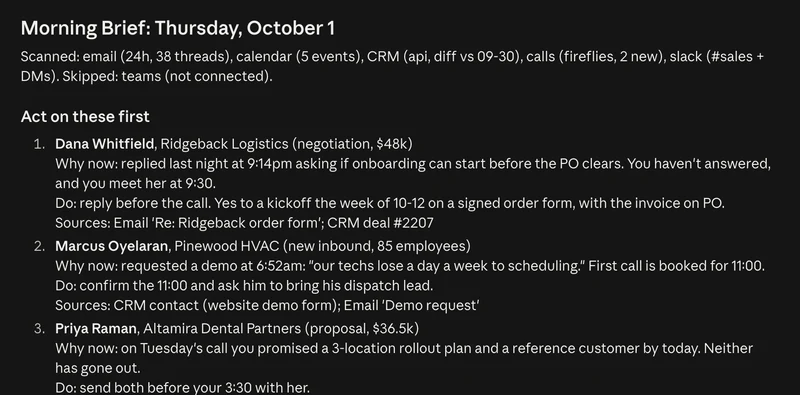
The daily brief brings together changes from your connected CRM, email, calls, and Slack. Prioritized contacts and suggested next steps give your rep a starting point.
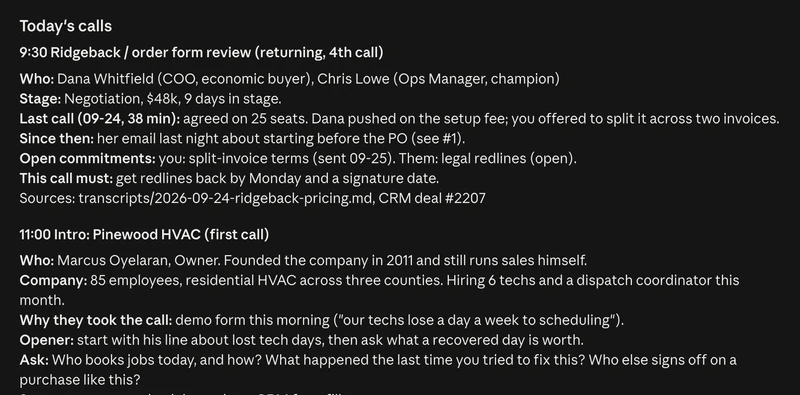
Prep cards bring together account research, previous conversations, open commitments, and questions to ask next.
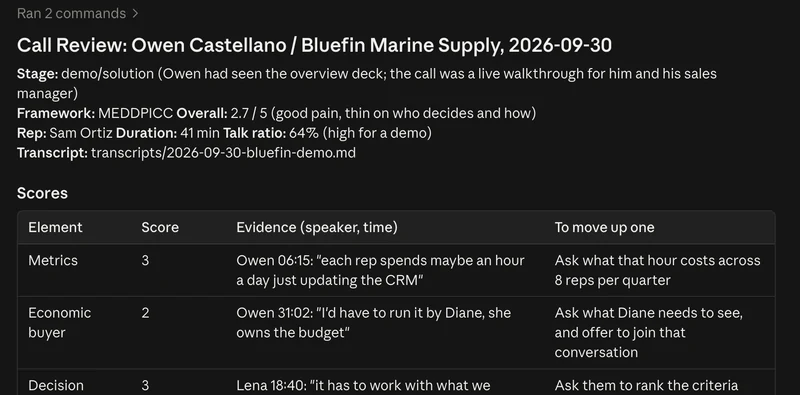
The watcher checks for new transcripts every 30 minutes. Available transcripts feed a draft in the rep’s voice, a list of next steps, and feedback on the call. Your rep reviews and sends.
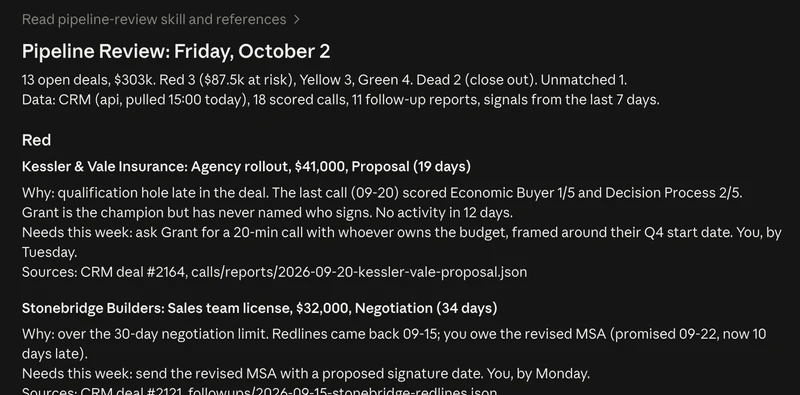
The pipeline review flags stalled deals and suggests an action for each, using CRM activity and available call context.
Account pages and a sales playbook collect buyer objections, commitments, and lessons from your calls, so reps can refer back to them.
04 · Personalized follow-ups
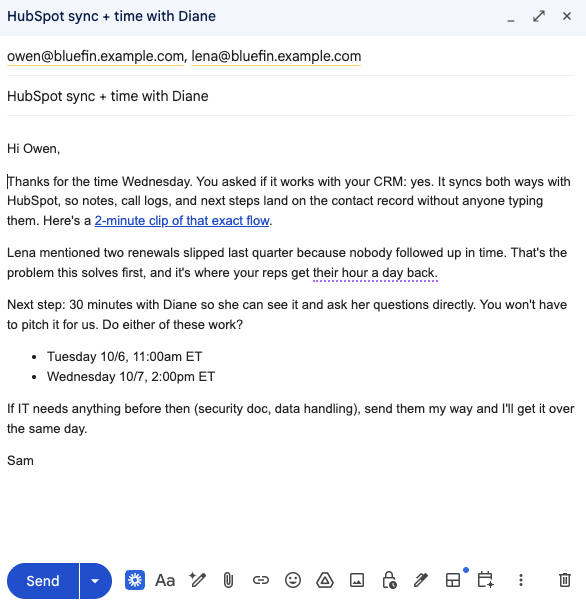
Sales Rep OS uses available call transcripts and connected account context to draft a follow-up in your rep’s voice, grounded in what the buyer actually said.
The transcript watcher checks for new calls every 30 minutes. Your rep reviews the draft, makes any edits, and sends it.
05 · How it works
01 · Download
Buy a seat, download the files, and open the folder in Claude Code.
02 · Connect
Type /onboard. The coach guides you through connecting supported tools and configuring workflows. Allow about 40 minutes.
03 · Review
Review the brief, prep cards, and drafts from your connected data. Your rep decides what to use and what to send.
Each rep needs Claude Code, a separate Claude subscription, and access to the tools they connect. Scheduled jobs run on the rep’s machine. See the setup and compatibility details below.
06 · What’s in the box
We built this setup for our own sales work. The download gives your team the workflows and an onboarding coach to configure them for your business.
The downloadable workspace: 6 subagents, 6 skills, and 17 commands, plus a structured knowledge base. One licensed workspace per rep.
Guides you through connecting supported tools and configuring the workspace. Allow about 40 minutes; access to your tool accounts is needed.
Configure the daily brief, transcript checks, and pipeline reviews on the schedule you choose. Scheduled work runs on the rep’s machine.
Files for your ICP, accounts, contacts, and call insights, built from the tools and transcripts you connect.
Adjust the workflows, call framework, and writing voice for your business. The skills and agents are files your team can read and edit.
07 · Your stack, your rules
Connect your CRM, call recorder, email, calendar, and team chat. The workspace files live on each rep’s machine, and your rep reviews the drafts before sending.
HubSpot, Pipedrive, and GoHighLevel connect directly. Other tools may need an adapter or CSV export; the available workflows depend on the connection. See the compatibility FAQ below.
What clients say about our broader AI work at TitanStack.
I’m now much faster at getting the AI to work for me, I understand how the systems fit together, and I can diagnose and fix issues on my own, something I couldn’t do before. It probably would have taken me a year of trial and error to get here.
What impressed me most about working with TitanStack AI wasn’t just the technology, it was how they operated as an extension of our team. They handed us a clear, prioritized path forward instead of a black box.
08 · Pricing
Get the workspace and guided setup for one rep. Put it to work with your tools and real sales tasks before deciding whether to equip the rest of your team.
Limited time: $120 → $27
$120$27
per seat, one-time. Regular price $120. $27 for a limited time.
Claude subscription and any paid data-provider usage are separate. Secure checkout by Stripe. The setup coach is included; an optional 60-minute call with our team is $297.
09 · Before you buy
A Claude subscription each (Pro at minimum; Max once the scheduled jobs are doing real work), Claude Code installed on a Mac or Linux machine, and about 40 minutes for the onboarding coach. No coding. Windows runs everything, but the scheduled jobs have to be set up in Task Scheduler by hand; the installer prints exactly what to enter.
HubSpot, Pipedrive, and GoHighLevel connect directly. Any CRM with a simple token API gets an adapter built during onboarding. Anything else works from a CSV export, with two limits: no daily CRM activity in the brief and no write-back. Recorders: Fireflies, Fathom, Gong, Zoom, or a folder you drop transcripts into.
The workspace files live on each rep’s machine. Claude processes the context used by the workflows, and connected services handle their respective API requests. Local workspace files do not mean all processing stays on the device.
You download the workspace right away, stamped to you. Open it in Claude Code, type /onboard, and the coach connects your tools step by step. Once setup is complete, the daily brief runs on the schedule you configure. If you want a human for that first session, add the 60-minute onboarding call at checkout. Not sure it fits your stack? Book a 20-minute fit call first and we will tell you honestly.
Not in this edition. Sales Rep OS Cloud adds automated prospecting (companies in your ICP showing a buying signal, deduped across every run) and contact enrichment with verified emails, as a plugin that runs alongside this workspace. Right after checkout you can start a 7-day free trial in one click; after that it is $19 a month, cancel anytime. Nothing in your setup is lost either way.
Teams that want something to send on a rep’s behalf; this never will. Teams that need one dashboard for everyone today; this is one workspace per rep, and a team roll-up is not built yet. Teams that do not record calls and will not start; the brief and the pipeline review still run, but scoring, follow-ups, and the playbook need transcripts.
Give one rep the workspace for briefs, call prep, and follow-up drafts. Connect your tools, review the output, and decide whether it fits the way your team sells.
Get one seat for $27